I have a SunOS 4.1.4 disk image that I use on my SPARCstation 1, SPARCstation 2, IPC and IPX. I curated it over about a year to include a lot of updated and nonstandard things. I built it originally on my IPX, but it became my go-to for all my sun4c boxes.
I’ve always wanted to run 4.1.4 on my SPARCstation 5, a sun4m architecture, and under QEMU, but both of those are sun4m and a sun4c image won’t boot on them.
I’d kicked around the idea of “going back in that
house” and doing a fresh install of 4.1.4 on the
SPARCstation 5, but honestly it had been difficult
enough to get running the first
time that I
just couldn’t face it. Between getting the disk label
correct, the miniroot install, building the DNS
resolver into libc, reinstalling MIT X11R6 alongside
OpenWindows, and moving over the statically linked
Motif window manager, it just sounded like a nightmare.
Yesterday I did a little research, and as it turns out, nearly all of a 4.1.4 install is the same between the 4c and 4m architectures. Only the boot files and some of the kernel-access pieces are different.
So I asked Claude about it. Claude did some research too, and it seemed possible, although neither of us could find a single reference where anyone had actually done it. Some had started and failed. Even Sun’s own documents suggested this was a thing that could be done.
If we got it to work, I could thread the needle and have both my SPARCstation 5 and QEMU running with an hour or two of effort.
I do a lot of agentic coding with Claude now, but this was the first historic-system-admin-heavy thing I had ever attempted with it. After discussing what I thought might work, I had Claude verify the idea against what it knew and could find on the web.
The rough procedure was to take the working image off the ZuluSCSI in my SPARCstation 2 (SS2), copy it, rename it, and set it to SCSI ID 2. I also tried to mount the 4.1.4 install ISO on the SS2 at the same time, but for some reason I had problems mounting it there. Worried this would be a deal killer, I found I could mount it on my Mac instead, so I just copied off the required files (only a handful) and moved them to the SS2 in a tarball.
After booting the regular 4.1.4 image, we would mount the image destined for the SPARCstation 5 (SS5) and surgically hack in the correct boot and kvm-access files. Then I’d move that image over to the Zulu in my SS5 and try to boot it. Having Claude build the entire checklist with age-appropriate SunOS commands was a big help, and I had a second agent double-check both the concept itself and the individual operations before I started typing.
So instead of reinstalling, I grafted sun4m kernel
support onto a copy of the disk and left the userland
completely alone. It worked. The rest of this article
is the clean version of what we did, the procedure that
came out the other side of the trial and error with the
wrong turns left out. The customizations I was so
anxious not to lose, the hand-built disk label, the
DNS resolver linked into
libc, and the
MIT X11 and OpenWindows setup, all came through
untouched.
How a 4.1.4 system is laid out
SunOS 4.1.4 keeps two separate architecture identities, and the whole approach hinges on the difference between them:
- Kernel architecture — sun4c vs sun4m. This differs per machine, and this is the only thing we change.
- Application (binary) architecture —
sun4for the entire SPARCstation desktop line. It is shared across every kernel arch above.
A running sun4m 4.1.4 system reports, via showrev -a,
Kernel Arch: sun4m together with Application Arch: sun4. Sun’s own media carries the kernel arches as
separate module sets (sun4.sun4c.sunos.4.1.4,
sun4.sun4m.sunos.4.1.4, and so on), all sharing the
leading sun4 binary class.
The implication is the thing that makes this safe: my
resolver libc, my MIT X11 libraries, my mwm, and
the whole OpenWindows tree are all application-arch
sun4. They run unchanged on a sun4m kernel. This is
also Sun’s documented heterogeneous design — /usr is
shared across architectures while the
kernel-arch-specific material is segregated into
/usr/kvm, plus the kernel and the boot program.
You can see Sun making that split themselves, right in
the installer. suninstall is the menu-driven,
full-screen program you run to lay down SunOS 4.1.x,
and it walks you through a series of forms — one for the
host identity, one for the disk label and partitioning,
and a software form where you pick what gets installed
and where it lands. That software form has two separate
path fields: Executables path:, which defaults to
/usr, and Kernel executables path:, which defaults
to /usr/kvm. Two fields, because Sun treats them as two
different things — the application-arch binaries that the
whole sun4 desktop line shares, and the
kernel-arch-specific binaries that differ per machine.
It is most obvious on a server that supports diskless
clients of more than one kernel architecture: when you
“add an architecture,” the thing that gets added is
another /usr/kvm set, never another /usr.
So the deduction is this. If the OS itself, at install
time, keeps the kernel-arch material in its own path and
shares everything else, then converting a disk from
sun4c to sun4m should be a matter of swapping only the
things on the /usr/kvm side of that line, plus the
kernel and boot program, and leaving /usr and the rest
of the root alone. That is exactly the graft. The disk
label, the resolver, and the X stack come through it by
design, not by hope.
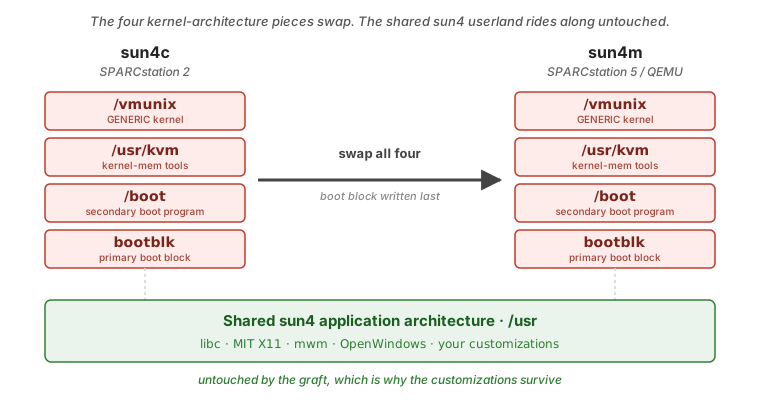
The four pieces that define kernel architecture
“Switch the disk to sun4m” is not a single pointer. It is four things, and all four have to flip together or the disk either won’t boot or will panic on certain commands.
| # | Piece | Location | If it’s wrong |
|---|---|---|---|
| 1 | Kernel | /vmunix | Wrong-arch kernel won’t run on sun4m |
| 2 | Kernel-mem tools and modules | /usr/kvm | ps, w, vmstat, pstat, crash panic or misread |
| 3 | Secondary boot program | /boot | PROM can’t chain to the kernel |
| 4 | Primary boot block | partition boot area | PROM can’t find /boot; silent dead boot |
The ordering rule matters: put pieces 1, 2, and 3 in
place first, then run installboot (piece 4) last.
installboot records the on-disk block list of
/boot, so /boot has to be final before you install
the block. Don’t change the filesystem layout after
installboot runs.
Piece 2 is the one people forget. /usr/kvm holds the
kernel-memory readers, and if it stays sun4c while the
kernel goes sun4m, ps and vmstat and friends will
panic the moment you run them. Mismatching it is the
classic silent failure.
Where the sun4m material comes from
This is the shortcut that makes the whole thing easy. On the SunOS 4.1.4 install CD, everything you need for all four pieces lives in one plain tar:
/export/exec/kvm/SUN4M_SUNOS_4_1_4/KVM
That is a tar of the entire /usr/kvm tree. You do
not need the SYS set (kernel source) or
MINIROOT_SUN4M (the install miniroot). Inside the
KVM tar:
./stand/vmunix→ piece 1 (the sun4m GENERIC kernel, about 2.23 MB)- the whole tar → piece 2 (extract it into
/usr/kvm) ./stand/boot.sun4m→ piece 3 (the secondary boot, about 103 KB)./mdec/bootsdand./mdec/installboot→ the piece 4 tooling
One trap worth flagging: the ./boot/ directory inside
the tar holds install-time standalone helpers (mount,
init, ifconfig), not the /boot secondary boot. The
real secondary boot is ./stand/boot.sun4m. Don’t
confuse the two.
Because it is Sun’s own tar, you can copy the raw KVM
blob to the SunOS box by any means (FTP in binary mode
works fine) and tar xpf reproduces it faithfully — no
re-tar, no ustar or 100-character path headaches. This
is exactly the handful of files I pulled off the ISO on
the Mac when the SS2 wouldn’t mount the CD.
The procedure
Do all of this on a copy of the disk and keep the original read-only. I worked on the copy attached as a second drive on the live SS2, with the staged sun4m files to hand (from the previous section), so the SS2’s own boot disk was never touched.
Mind the SunOS 4.x SCSI name reversal while you wire
things up: 4.x swaps targets 0 and 3, so target 3 maps
to sd0, target 0 to sd3, and targets 1 and 2 map
straight through. The OS root we’re copying lives at
target 3 on the SS2, so I grafted the copy at the free
target 2 slot (/dev/sd2), which is the one slot
whose target number and sd name match. That keeps you
out of the reversal trap, and it keeps installboot
well away from the live root.
On a standard 4.1.4 label, /usr is its own slice
(typically g), so mount both root and /usr before
you touch piece 2:
mount /dev/sd2a /mnt          # the copy's root
mount /dev/sd2g /mnt/usr      # the copy's /usr slice
If you skip the second mount, /mnt/usr is just an
empty stub and you’ll happily “replace” a /usr/kvm
that isn’t really there.
1. Back up the sun4c originals.
cp -p /mnt/vmunix /mnt/vmunix.sun4c
cp -p /mnt/boot   /mnt/boot.sun4c
mv /mnt/usr/kvm   /mnt/usr/kvm.sun4c
2. Install the sun4m /usr/kvm (piece 2).
mkdir /mnt/usr/kvm
cd /mnt/usr/kvm
tar xpf /path/to/KVM
3. Put the kernel and secondary boot in place (pieces 1 and 3). Both come straight out of the kvm tree you just extracted:
cp -p /mnt/usr/kvm/stand/vmunix     /mnt/vmunix
cp -p /mnt/usr/kvm/stand/boot.sun4m /mnt/boot
4. Comment out the boot-time RARP line while you’re
in here. Do this now, on the SS2, with the copy’s root
still mounted at /mnt. Back it up and comment out one
line in /mnt/etc/rc.boot:
cp -p /mnt/etc/rc.boot /mnt/etc/rc.boot.orig
# then put a '#' in front of this line in /mnt/etc/rc.boot:
ifconfig -ad auto-revarp up
Here is why it matters. If you leave that line in, the freshly grafted GENERIC disk will hang at boot, on a real SS5 and under QEMU, with this on the console:
revarp: Requesting Internet address for 8:0:20:77:39:ab
le0: TINT but buffer owned by LANCE
It looks like a hardware or driver fault, but it isn’t;
the lance works fine once it’s configured by hand. The
culprit is /etc/rc.boot. The earlier static ifconfig le0 <hostname> netmask + ... doesn’t bring le0 fully
up that early in boot (the netmask + and the resolver
aren’t available yet), so the interface is still down
when the unconditional ifconfig -ad auto-revarp up
fires. That sends a RARP out a down interface, wedges
the lance transmitter, and never times out. It happens
before init, so booting single-user (-s) won’t get
you past it either.
Commenting the line lets the boot fall through to
single-user; you bring le0 up later with a proper
static config. The reason to do it here, rather than
discover it on the SS5 (as I did), is that you already
have the filesystem mounted, and it’s safe before
installboot because it touches /etc/rc.boot, not
/boot. Doing it the other way around cost me a rescue
boot (a second SunOS or
Solaris
instance with this disk attached as a data drive) just
to comment one line. You can skip that whole detour.
5. Install the sun4m boot block, last (piece 4).
Use the sun4m installboot and the sun4m
bootsd, both from the kvm you just installed, pointed
at the copy’s raw root partition:
cd /mnt/usr/kvm/mdec
./installboot -vlt /mnt/boot bootsd /dev/rsd2a
A couple of things that bit me here, so they don’t bite
you. installboot itself is architecture-agnostic and
runs fine on the sun4c host, but the bootblk it
writes is arch-specific — the sun4m bootsd is a
different file from the sun4c one (10746 vs 10466
bytes), so you must use the sun4m one. And on OpenBoot
machines (both sun4c and sun4m) the bootblk keeps its
a.out header; this sun4m installboot does that by
default and offers no strip flag, so the
Bootblock will contain a.out header line is expected.
Do not pass -h.
This is also the single most dangerous keystroke in the
whole job. Point it at rsd2a (the copy at target 2),
never rsd0a, which is the SS2’s own live root. Get
that wrong and you overwrite your working boot block.
The output you want ends like this — capture it:
Primary boot: bootsd
Secondary boot: /mnt/boot
Boot device: /dev/rsd2a
Block locations:
startblk size
1b80       10
...
Bootblock will contain a.out header
Boot size: 0x19458
Boot checksum: 0x86693bac
Boot block installed
Boot size: 0x19458 is 103512 decimal, which is
exactly the size of boot.sun4m — a nice confirmation
that installboot read the secondary boot you intended.
6. Sync, unmount innermost-first, halt.
sync; sync
umount /mnt/usr
umount /mnt
halt
With the RARP line already commented in step 4, the copy is ready. Move the new boot image to a card for the ZuluSCSI in the SPARCstation 5.
Running it under QEMU
QEMU’s SS-5 machine is sun4m, which is the whole
reason for the graft. Put the root disk at SCSI unit
3 so SunOS sees it as sd0 (that 4.x target-to-name
reversal again), and boot from the explicit device
path:
qemu-system-sparc -M SS-5 -m 96 -nographic \
  -drive file=<disk>.img,bus=0,unit=3,media=disk \
  -nic user,model=lance
# at the OpenBIOS prompt:
0 > boot /iommu/sbus/espdma/esp/sd@3,0 -s
Keep -m no larger than the disk’s swap slice — mine
is 96 MB, so 96 MB of RAM. The user (slirp) network
gives you gateway 10.0.2.2, guest 10.0.2.15, and a
DNS forwarder at 10.0.2.3; configure le0 as
10.0.2.15/255.255.255.0 and the resolver and the rest
of the userland come right along.
Proving it
The point of the graft is that the kernel arch flips while the application arch — and therefore everything I cared about — does not. These four commands are the proof:
arch -k          # sun4m   (kernel arch flipped)
arch             # sun4    (app arch unchanged)
ps -aux ; vmstat 1 3 ; pstat -T   # kvm readers must NOT panic
showrev -a       # Kernel Arch: sun4m / Application Arch: sun4
If arch -k says sun4m and the kvm readers run
without panicking, all four pieces are correct and the
userland survived. On my disk showrev -a came back
Kernel Arch: sun4m, Application Arch: sun4, hostname
intact, OpenWindows and the SunView X libraries present
and unbothered.
Test on the real hardware in between
One thing I’d do again: I didn’t go straight from the SS2 to QEMU. I staged it in three steps, each isolating exactly one unknown.
I built the artifact on the SS2, where the only way to fail is assembling the disk wrong. Then I moved the copy to a real SS5 to prove the disk independent of the emulator. If it boots on real hardware, the graft is correct; if it dies there, the procedure is wrong and QEMU was never the issue. Only then did I boot it under QEMU, where anything that broke had to be an emulation quirk rather than a broken disk.
That middle step paid off. On the real SS5 the grafted
disk loaded the sun4m bootblk, chained through
boot.sun4m to the sun4m vmunix, and the GENERIC
kernel came up reporting cpu = SUNW,SPARCstation-5:
SunOS Release 4.1.4 (GENERIC) #2: Fri Oct 14 1994
cpu = SUNW,SPARCstation-5
mem = 261760K
sd0 at esp0 target 3 lun 0   <SUN2.1G ...>
le0: Twisted Pair Ethernet
revarp: Requesting Internet address for 8:0:20:77:39:ab
le0: TINT but buffer owned by LANCE
The boot chain was proven right there — and the only
thing standing between me and a login was that
rc.boot RARP hang, which is a userland config issue,
not a graft fault. Had I jumped straight to QEMU and hit
the same hang, I’d have spent a day blaming the
emulator.
Rollback
This is reversible, which is the other reason to work
on a copy. Every replaced file has a .sun4c backup
beside it: vmunix.sun4c, boot.sun4c, and
usr/kvm.sun4c. To revert the copy to sun4c, restore
those three and re-run installboot with the sun4c
/boot and bootsd. The original disk image is never
written at any point in the procedure, so if the copy
gets wrecked you just copy the original again and start
over.
The net result is the disk I spent all those evenings building, now booting as sun4m on an SS5 and under emulation, with not one line of the userland touched. A reinstall would have cost me days. The graft cost an afternoon.
Availability
I will eventually roll this into a new bootable disk image under the SPARCstation 5 section, but right now I’m busy with another project, macXserver. Its next version will ship with prebuilt QEMU, Solaris, and SunOS 4.1.4 images.