I have a basement full of Sun workstations, all with keyboards, graphics cards, and displays. But it would be nice to have a good X server running on my Mac. Yes, I can run XQuartz, but I’m never really happy with that solution. I want anti-aliased fonts, Retina awareness, rootless rendering, scalable display for resolution matching. Real Mac windows surrounding Sun pixels.
I write a lot of software, even after I retired, but honestly I’d shelved this one. Building an X server is a real piece of work, and this project has sat on the “someday” list and stayed there.
But Claude Code changed the math. Over the last few months I’ve put it to work on a stack of projects I never would have attempted, and the productivity is amazing.
This morning I thought: could Claude and I actually build an X server for the Mac? I’m not interested in a completely modern one with all the extensions, but rather one that can render X11R5/R6 clients and actually look good and work well, using the Mac’s Core Graphics routines, which are really quite excellent.
The full answer is going to take a while, and the larger arc of this project isn’t ready to tell yet. But the first piece is already running, and that’s what this article is about.
Creating a Man-in-the-middle attack, on purpose
Before you can write an X server, you have to know byte-for-byte what a real X client expects to talk to. The X.org protocol docs are solid, and I’ve read them carefully. It’s all binary frames of data, so not super easy to decode without writing even more software.
But docs only describe what ought to happen on the wire. Real clients and real servers have version quirks and sequencing that only show up when you watch them talk. Validating the docs against actual traffic is what closes the gap. A spec is not a conversation.
So today Claude and I wrote a passive proxy in Swift. Kind of like pcap or tcpdump, but just for the X wire protocol.
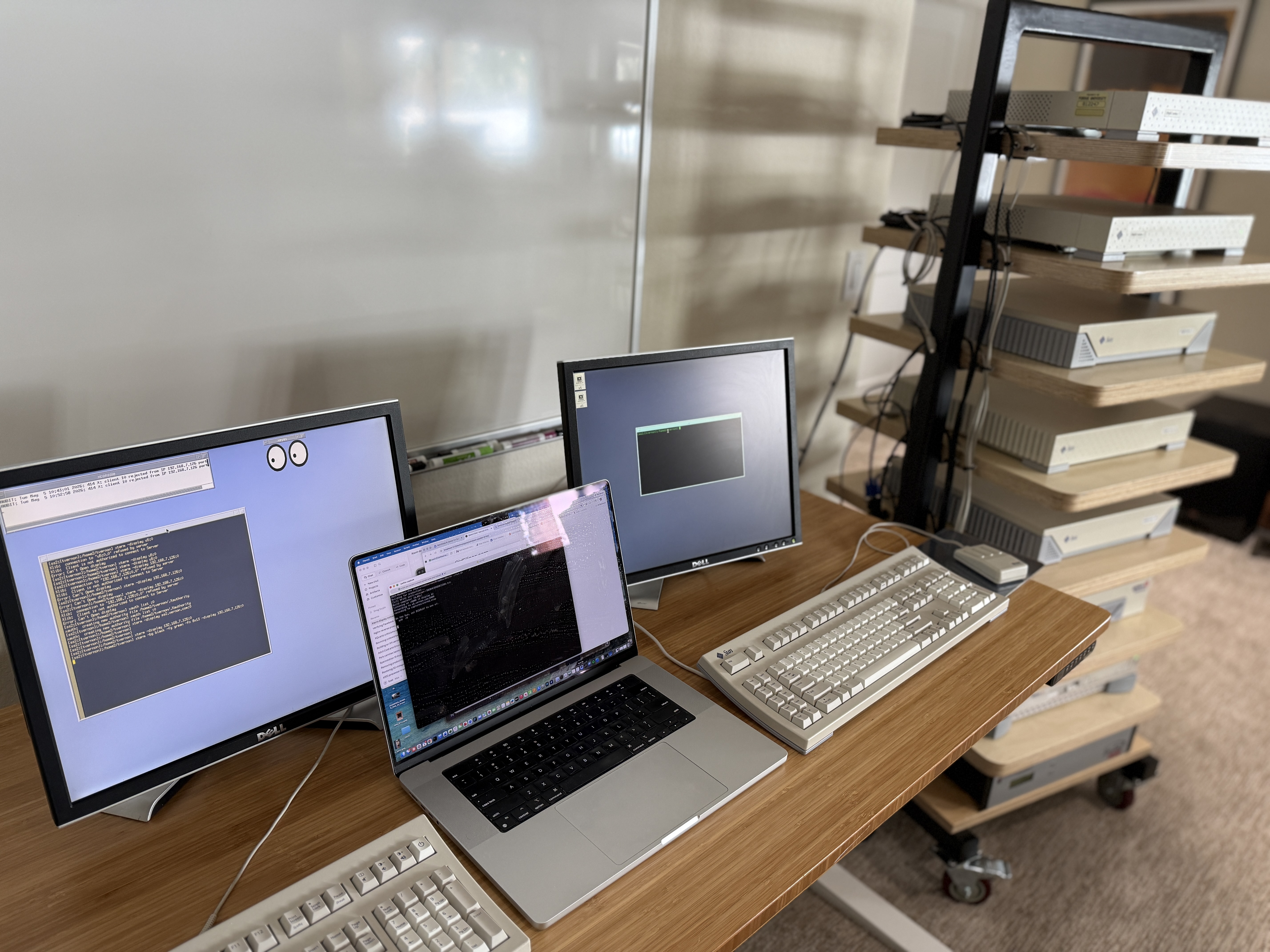
The two Sun boxes are my SPARCstation 2 running a color-capable xterm (xterm with the ANSI color extensions) and my Ultra 5 running Solaris 2.6 and CDE. The proxy runs on my Mac laptop, in between. The SS2 thinks it’s connecting to an X server at the Mac’s IP. The Mac accepts the connection, opens a second connection to the real X server on the Ultra 5, and moves packets (X protocol frames) in both directions, writing every one to a capture file as it goes, decoding the ones it understands, and passing through the ones it doesn’t.
From the SS2’s side, the Mac is the X server. From the U5’s side, the Mac is the client. Neither end knows the other is there. You know you’re dealing with old software when you can so easily do this.
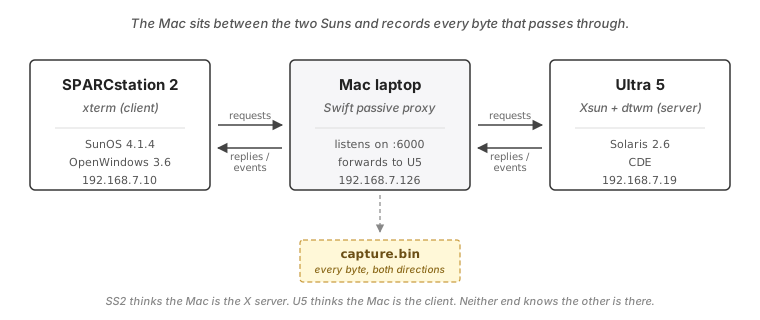
This is, strictly speaking, a man-in-the-middle attack. It is also a perfectly good way to record protocol traffic when both ends belong to you.
The xterm invocation on the SS2 was:
[ss2:[tvernon]:/home2/tvernon] $ xterm \
       -bg black -fg green -fn 8x13 -display 192.168.7.126:0
192.168.7.126:0 is the Mac. The proxy listens on
TCP port 6000 (X display :0), forwards to the
U5’s X server on its own port 6000, and writes
every byte that passes through to disk. A second
Swift program decodes that capture file and prints
one line per protocol message: timestamp from
connection open, direction, message kind, key
fields. → is client to server, ← is server to
client.
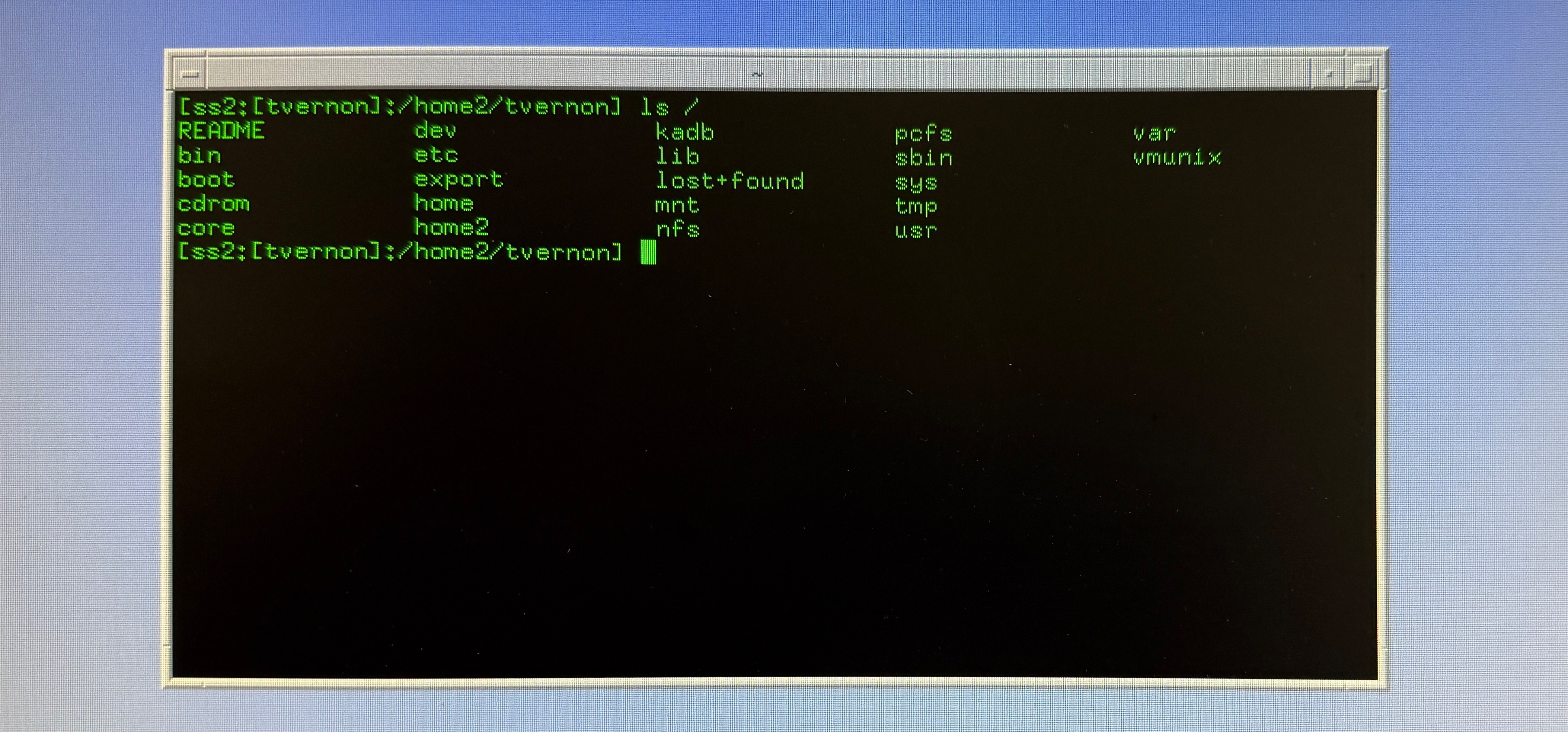
What follows is the first 980 milliseconds of one xterm session, captured exactly that way.
Handshake
  0.000ms → SetupRequest   msbFirst proto=11.0 auth=(none)
  5.118ms ← SetupAccepted  "Sun Microsystems, Inc." rel=3600
                           1280x1024 depth=8
The Sun says hello in big-endian byte order. The X wire protocol can be either big-endian or little-endian; it’s decided by the client. SPARC is natively MSB-first, so xterm announces itself that way and the server accepts. The vendor string in the reply is “Sun Microsystems, Inc.” Release 3600 corresponds to OpenWindows 3.6, the Xsun build that shipped with Solaris 2.6. Five milliseconds to negotiate over the LAN.
The screen on my Ultra 5 is set to 1280×1024 at 8-bit depth, so that’s what the X server presents to the client.
X11 does its own access control at connection
setup: the client typically presents a shared-secret
cookie that the server has to recognize before any
real traffic flows. auth=(none) in the
SetupRequest means there was no
MIT-MAGIC-COOKIE
handshake — that step was skipped on this
connection. I had xhost + set on the server for
this capture, and the Mac proxy didn’t care about
security, so the LAN was the trust boundary.
Cursors and colors
xterm spends the next 200ms doing housekeeping. It reads the user’s resource defaults, allocates foreground and background colors, opens the X “cursor” font, and then carves seven glyph cursors out of it:
  156.894ms → OpenFont          fid=0x4400001 name="cursor"
  156.894ms → CreateGlyphCursor cid=0x4400002 src=0x4400001 ch=152
  156.894ms → CreateGlyphCursor cid=0x4400003 src=0x4400001 ch=116
  156.894ms → CreateGlyphCursor cid=0x4400004 src=0x4400001 ch=108
  156.894ms → CreateGlyphCursor cid=0x4400005 src=0x4400001 ch=114
  156.894ms → CreateGlyphCursor cid=0x4400006 src=0x4400001 ch=106
  156.894ms → CreateGlyphCursor cid=0x4400007 src=0x4400001 ch=110
  156.894ms → CreateGlyphCursor cid=0x4400008 src=0x4400001 ch=112
Char 152 is the I-beam, the cursor xterm shows inside the terminal area. The other six (106, 108, 110, 112, 114, 116) are all scrollbar cursors: up-arrow, down-arrow, left-arrow, right-arrow, and the horizontal and vertical double-arrows. Every cursor xterm could possibly display through its lifetime is allocated up front, before the window is even visible. That’s a performance trick: pay the allocation cost during startup so you never pay it during interactive use.
A window is born
Then xterm builds its top-level window:
  203.247ms → CreateWindow    wid=0x440000D parent=0x28
                              1x1 at (0,0) inputOutput
  203.247ms → ChangeProperty  WM_NAME = "xterm"
  203.247ms → ChangeProperty  WM_ICON_NAME = "xterm"
  203.247ms → ChangeProperty  WM_COMMAND =
              "xterm -bg black -fg green -fn 8x13
               -display 192.168.7.126:0"
  203.247ms → ChangeProperty  WM_CLIENT_MACHINE = "ss2"
  203.247ms → ChangeProperty  WM_NORMAL_HINTS  (72 bytes)
  203.247ms → ChangeProperty  WM_HINTS         (36 bytes)
  203.247ms → ChangeProperty  WM_CLASS = "xterm/XTerm"
  203.247ms → OpenFont        fid=0x440000E name="8x13"
  203.247ms → QueryFont       font=0x440000E
  231.239ms ← QueryFontReply  ascent=11 descent=2
                              chars=256 properties=21
The window is created at 1×1 pixels as a
placeholder. xterm tells the window manager its
preferred size through WM_NORMAL_HINTS rather than
baking it into CreateWindow, and lets the WM
finalize geometry from there. Then the seven
ICCCM
(Inter-Client Communication Conventions Manual)
properties go up: title, icon-name, the literal
command line, the host ("ss2" is my SPARCstation
2), size hints, input hints, class.
This is the convention every X window manager
since the late-80s ICCCM drafts has looked at to
populate its title bar and decorations.
The 8x13 font is a classic monospace X bitmap
font. The QueryFont reply comes back
28ms later: ascent=11, descent=2, chars=256, properties=21. The 21 properties are
XLFD
metadata: POINT_SIZE=120 (12-point),
WEIGHT=10 (medium), RESOLUTION_X/Y=75 75
(75dpi, the standard X resolution of the era).
Several of those property names resolve to
predefined atoms whose numeric IDs were assigned
in X11 itself and have not changed since.
The window actually appears
xterm creates an inner window for the actual text rendering, grabs the three mouse buttons twice each (I read somewhere that this avoids accidental clicks at startup), and asks the server to map everything:
  497.466ms → MapWindow       window=0x440000D
  497.466ms → ImageText8      drawable=0x4400011
                              gc=0x440000F at (2,13) " "
  497.466ms → PolyLine        drawable=0x4400011
                              gc=0x440000F points=5
  509.177ms ← ConfigureNotify window=0x440000D
                              644x316 at (0,0)
  509.177ms ← ReparentNotify  window=0x440000D
                              parent=0x3800106
  509.177ms ← ConfigureNotify [SendEvent]
                              644x316 at (225,225)
  514.764ms ← MapNotify       window=0x440000D
  514.764ms ← Expose          window=0x4400011
                              (0,0) 644x316
  515.728ms ← FocusIn         window=0x440000D
                              detail=nonlinear
Three things happen in that block.
MapWindow makes the top-level visible. The two
requests right after it draw a placeholder character
and a five-point PolyLine. The PolyLine is xterm’s
text cursor outline being stamped into the inner
window, so the cursor is on screen the instant the
window itself appears.
Then ReparentNotify shows CDE’s
dtwm
inserting xterm into a frame window. From the window
manager’s perspective xterm is no longer the
top-level; it is now a child of 0x3800106, which
is dtwm’s title-bar frame.
The first ConfigureNotify, at offset (0,0),
is the real geometry event the server sent. The
second is synthesized by the window manager and
re-sent, with absolute screen coordinates (225,225)
instead of position-within-parent. That is the
ICCCM-mandated synthetic ConfigureNotify, specced in
1989 so X clients can know where they sit on the
root window without traversing the parent chain
themselves. Every X window manager still does it.
I am watching a SPARCstation perform a 1989
handshake, with the bytes decoded in 2026 by Swift
code that didn’t exist the night before.
First prompt
  980.222ms → ImageText8 drawable=0x4400011 gc=0x440000F
                         at (2,13)
                         "[ss2:[tvernon]:/home2/tvernon] "
Half a second after the window appeared, the shell
finally drew its prompt. ImageText8 sent the
literal prompt string into the inner window at
pixel (2,13) using graphics context 0x440000F.
That was the first thing on screen the user could
read.
From the moment the TCP connection opened to the
moment [ss2:[tvernon]:/home2/tvernon] was
visible on the Sun’s screen: 980ms. 62 requests
went out, 7 events came back, and the whole
conversation in both directions fit in about 15
KB.
The X protocol is brutally efficient this way. The whole 980ms conversation — handshake, font metadata, every cursor, every property, every event — fit in about 15 KB on the wire. A single 1280×1024×8-bit screenshot of the resulting window would be 1.3 MB on its own, roughly 90× larger than the entire conversation that drew it. X sends drawing commands, not pixels. That’s the design Bob Scheifler and his team at MIT shipped in 1987.
Testing more apps
I went on to capture the transactions of all the standard MIT X11 apps: xeyes, xclock, xcalc, xlogo, xload, and xbiff. Each capture filled in more holes in the protocol coverage.
The final app I tried was one I wrote myself,
back in 1994 (I think), on
SunOS 4.1.4
running the
Motif
window manager. I had bought the Xm libraries
and mwm from one of the third-party Motif
vendors of the era; the name escapes me.
Pre-CDE, that was the only way to do Motif
programming on a Sun. (Disk images and setup
notes for that stack live at
SunOS 4.1.4 disk images
and
Getting SunOS 4.1.4 working,
if you want to follow along.)
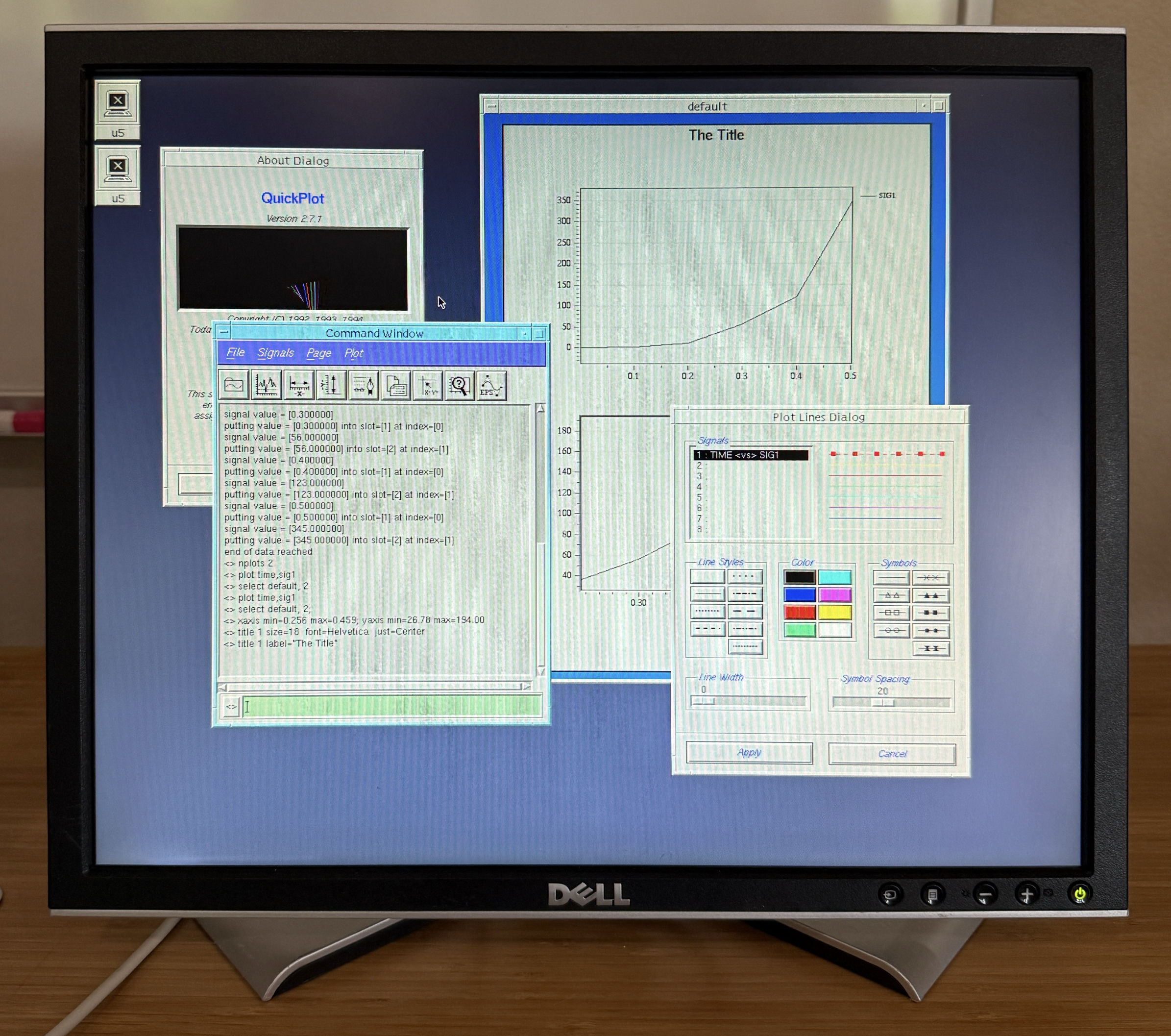
The program is QuickPlot, a 2D time-history plotting application that ended up being used at NASA for at least two decades after I left. NASA still has the source if you ask. It leans heavily on Motif and does a lot of the things X clients do once they get serious: grabbing the pointer for rubber-band zoom selections, juggling keyboard modifier state, manipulating the colormap, and so on.
Adding QuickPlot to the captures pushed the
combined coverage to roughly 70% of the X11
wire opcodes — a pretty healthy number for one
morning’s work. The rest are the niche corners
of the protocol: keyboard- and pointer-remapping
(SetModifierMapping, SetPointerMapping),
PseudoColor colormap manipulation
(AllocColorPlanes, StoreColors),
motion-event history queries
(GetMotionEvents), and a handful of oddballs
like NoOperation, which is literally a padding
opcode.
What I’m doing with this
The capture tool that produced this dump is the first piece of a Swift X server I’m building so my Suns can render properly on my Mac. The next piece is the server itself. The framer that decoded these messages goes into that server unchanged. Every byte of every message in this dump becomes a test fixture, alongside the other captures I took this morning: xeyes, xclock, xcalc, and a Motif graphing app I wrote 30+ years ago. The server will eventually have to consume and produce these exact byte sequences in response to these exact clients. Real captures from real Suns are the hardest thing to argue with.
There’s a larger arc to this project that I’ll write up when it’s ready. For now, this is what one morning’s worth of curiosity looks like on the wire.
If you have a SPARCstation in a closet and you want to know what its xterm does in its first 980 milliseconds, the answer is: this.